
This project was engineered to replace manual tracking with a centralized, automated digital solution. By leveraging the Microsoft Power Platform, I architected a secure database, a highly responsive user interface, and an automated notification engine to ensure zero lapse in license validity.
Context
Managing compliance and operational licenses requires strict oversight and accurate record-keeping. To transition our tracking from manual spreadsheets to a centralized system, I engineered an end-to-end digital solution using the Microsoft Power Platform. This project highlights my ability to take raw data, build a responsive interface, and architect automated background workflows.
Project Domain & Timeline
Enterprise Operations & Compliance
Mar 2026 - Mar 2026
Tools
Power Apps, Power Automate, SharePoint, Power Fx, Relational Database Modeling, UI/UX Design, Single-Page Application (SPA) Architecture, Process Automation, OData Queries, HTML/CSS
The Risk of Manual Data Management
Problem
The existing approach to tracking Amazon Seller Licenses lacked structural integrity. The core issues identified were:
Data Fragmentation: Critical license details, expiration dates, and seller information were scattered, making it difficult to generate a single source of truth.
Lack of Proactive Alerts: Operators had to manually calculate and monitor expiration dates, leading to a high risk of licenses lapsing unnoticed.
Inefficient Workflows: Updating records required navigating through clunky, non-intuitive spreadsheet rows, which discouraged operators from keeping the data clean and current.
Hypothesis
I developed an end-to-end solution utilizing SharePoint for relational data storage, Power Apps for a fluid front-end interface, and Power Automate for backend logic. The resulting application provides operators with a secure, search-driven dashboard that drastically reduces the time required to manage records, while background automations proactively safeguard the business from compliance failures.
The Objective
Establish a clean, relational database that acts as the single source of truth for all license records.
Techniques & Implementations
The foundation of any robust enterprise application is its data model. Relying on flat-file spreadsheets creates data silos, formatting inconsistencies, and severe compliance vulnerabilities. My first technical priority was to migrate the unstructured legacy data into a secure, relational database using Microsoft SharePoint. By intentionally defining column schemas and enforcing system-level constraints, I ensured that the application's data remains clean, standardized, and highly scalable from day one.
Excel Data Import
Bootstrapped the database by importing existing legacy data directly from Excel into a new SharePoint List, ensuring a smooth transition without data loss.
Column Alteration
Altered the default, raw columns to fit the strict needs of the application, converting generic text fields into specific data types to enforce data integrity.
Choice Columns
Implemented strict dropdown Choice columns for tracking "Status" (e.g., Active, Expiring Soon), preventing user spelling errors from corrupting the database.
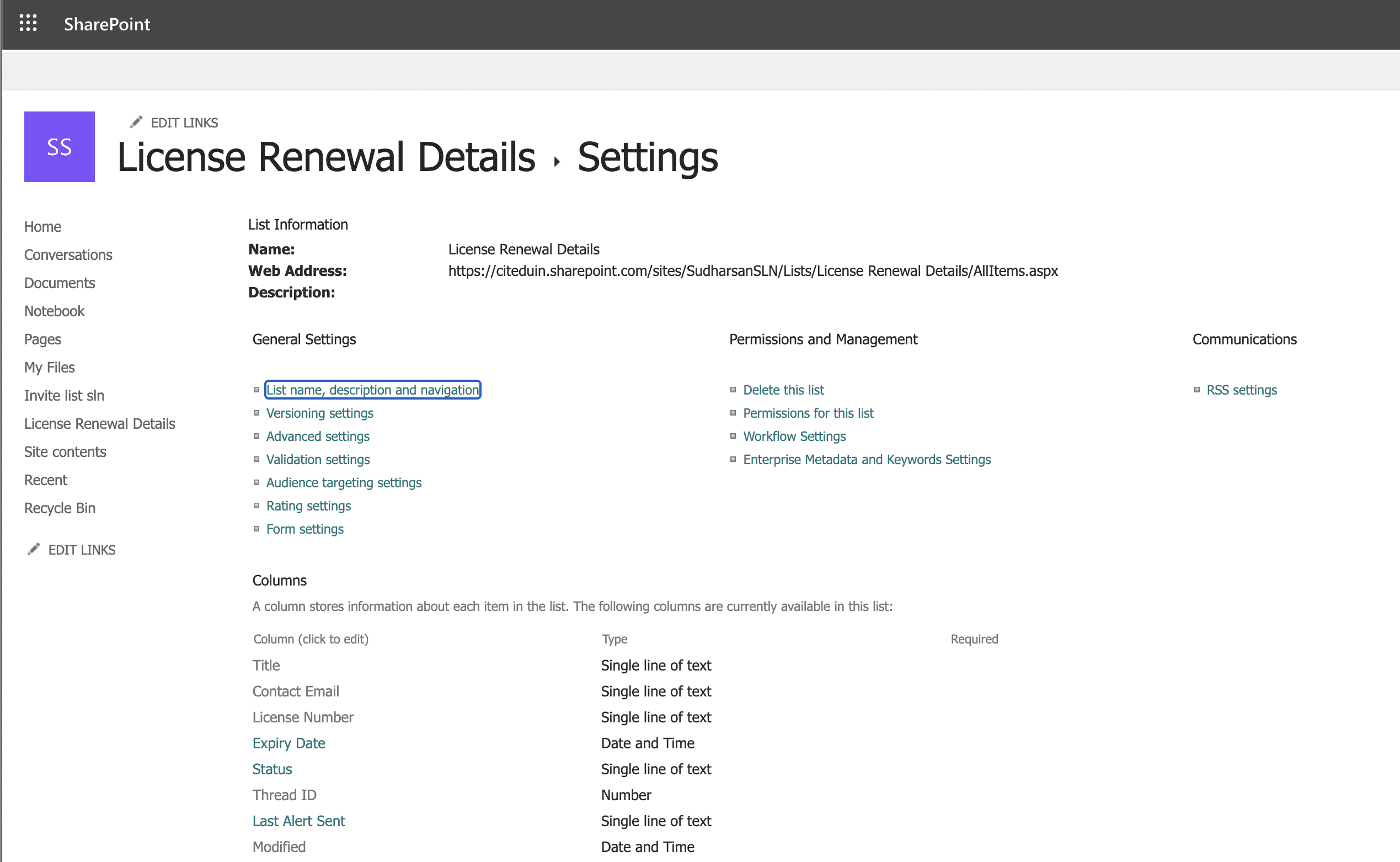
Screenshot of SharePoint List Settings showing the customized column types
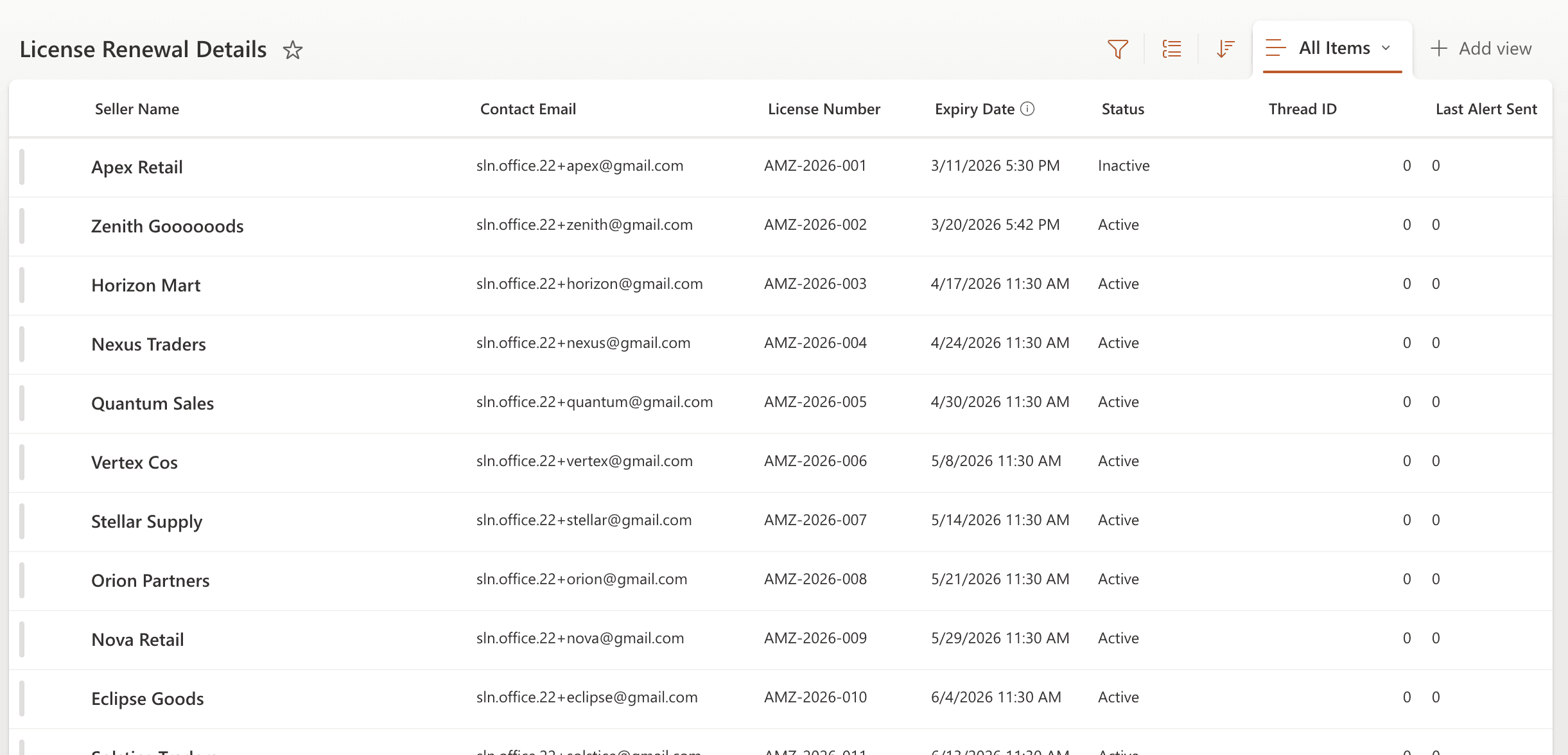
Screenshot of SharePoint table view after all the changes
The Objective
Build a responsive, single-page Canvas App that allows non-technical users to quickly search, update, and create records without navigating through a clunky interface.
Techniques & Implementations
With the database secured, I focused on building a front-end interface that defied the stereotype of clunky enterprise forms. Leveraging my UI/UX background, I utilized Power Fx and Canvas App components to architect a highly responsive, Single-Page Application (SPA) experience. The core objective was to drastically reduce the user's cognitive load. By keeping operators on a single, fluid dashboard, they can dynamically search, view, and edit complex records without ever experiencing a page load or losing their context.
Gallery Views
Engineered dynamic galleries connected directly to the SharePoint database to render large datasets quickly and efficiently.
Live Search & Gallery Filtering
Video showing the gallery live-search
List Visualizations
Structured the incoming data into clean, readable list formats so operators can scan critical license details at a glance.
Custom Buttons
Configured interactive buttons with dynamic mathematical formulas (e.g., buttons that scale their own width based on character length).
Layered Icons
Utilized and layered system icons to create intuitive, easily recognizable touchpoints for editing, saving, and adding new records.
Reusable Components
Built standardized UI components to ensure visual consistency across the entire application while reducing redundant build time.
Containers
Wrapped interface elements inside responsive Containers to move away from rigid, hardcoded X/Y coordinates.
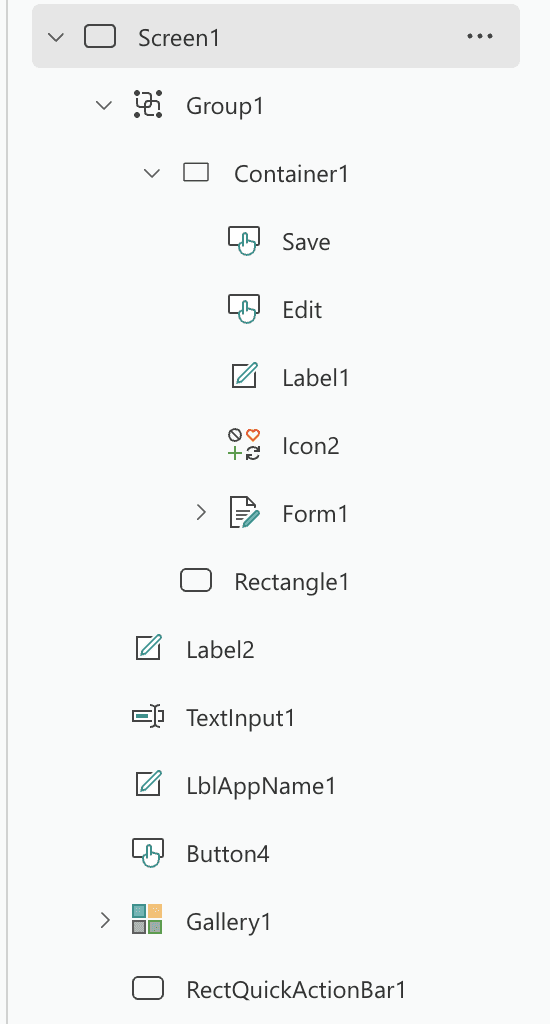
Screenshot of Tree View of our Single-Page Application (SPA)
Mathematical Responsive Layout (X & Width Properties)
Groups
Bundled related UI elements together into standard Groups to manage their visibility and properties as a single unit.
Popup Modals
Engineered a custom, semi-transparent popup overlay that acts as a single-page application, preventing the need to build separate screens for viewing and adding data.
State Management: The Single-Page Model
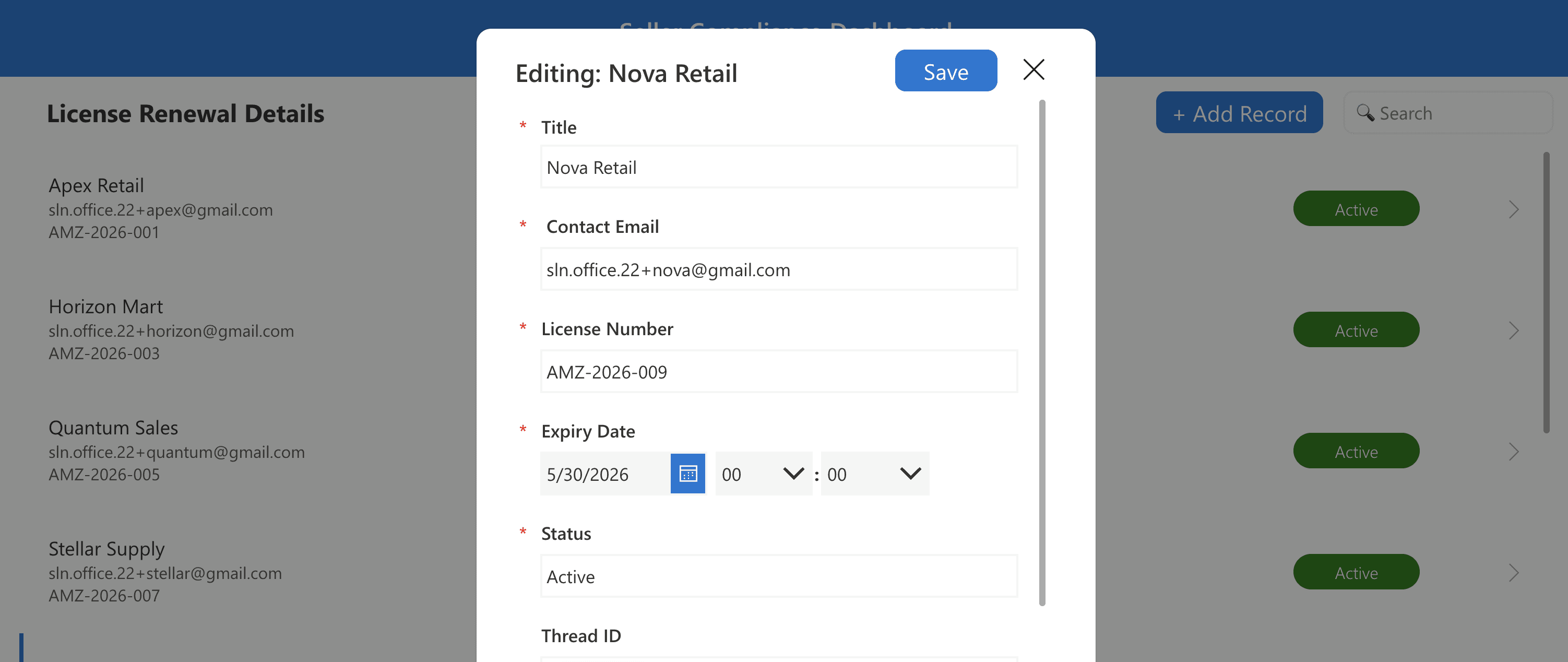
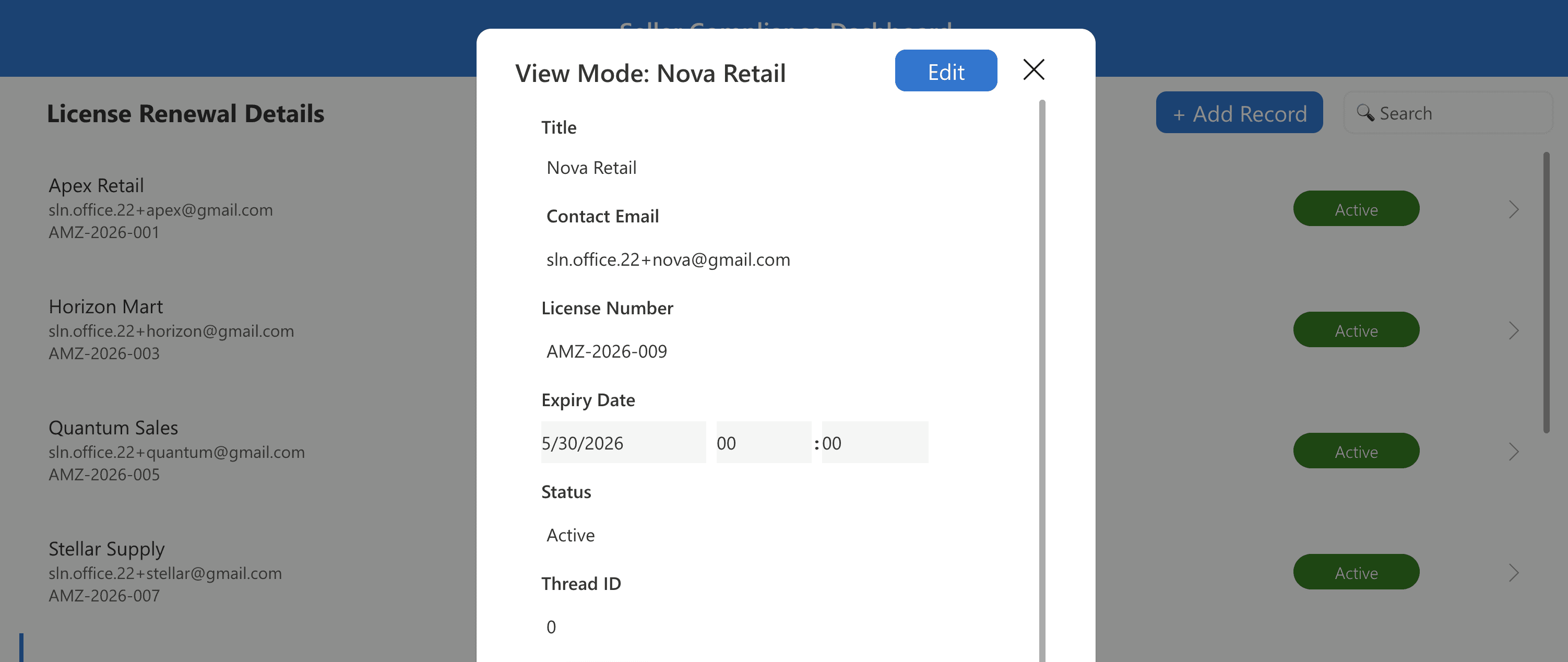
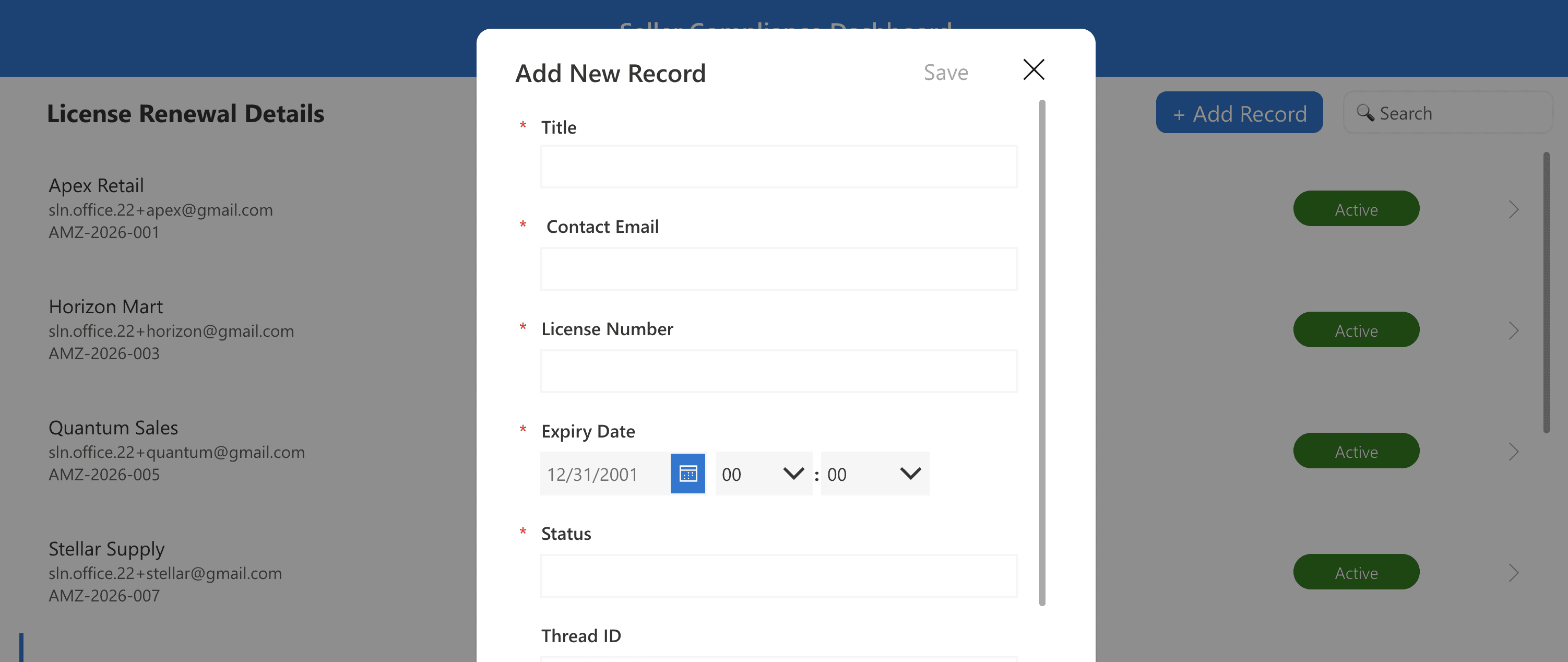
Screenshot of the Popup view along with different modes of form
Preventing UI Glitches (The Form's OnSuccess Property)
The Objective
Replace manual expiration tracking with a proactive, background logic engine that automatically alerts stakeholders when a license is nearing its end date.
Techniques & Implementations
An application is only truly efficient if it actively drives business action. While the Power Apps dashboard made data entry lightning-fast, relying on human operators to manually check the dashboard for expiring licenses still left a margin for human error. To close this gap, I engineered an independent, server-side logic engine using Power Automate. This flow acts as an automated compliance officer, constantly querying the database in the background and shifting the entire business model from "reactive monitoring" to "proactive notification."
SharePoint Table Linking
Directly connected the SharePoint database into the cloud flow to pull live record data at all times.
Apply to Each Loops
Utilized looping architecture to systematically iterate through every single license record in the database, evaluating them one by one.
Primary Conditions (True/False)
Implemented standard logic gates to check if a license date was approaching expiration (True) or still valid (False).
Nested True/False Sequences
Engineered a multi-tier logic tree inside the primary condition to specifically isolate records that were exactly 10 days, 7 days, and 2 days away from expiration.
Outlook Integration
Linked the Outlook.com connector to trigger automated warning emails directly to the compliance manager.
Same-Thread Email Generation
Configured the flow to generate the 7-day and 2-day warnings as direct replies under the exact same mail thread as the initial 10-day warning to prevent inbox clutter.
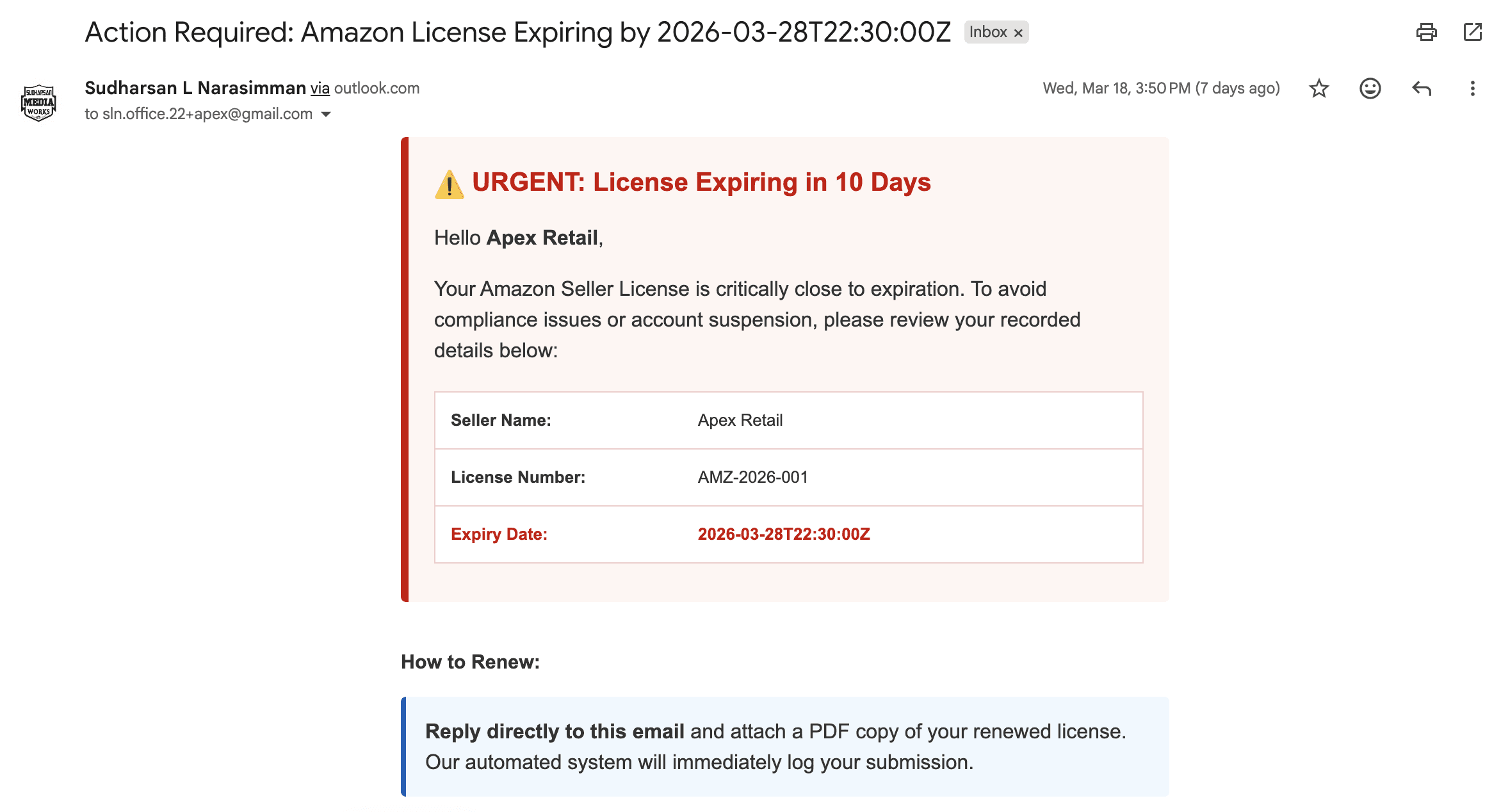
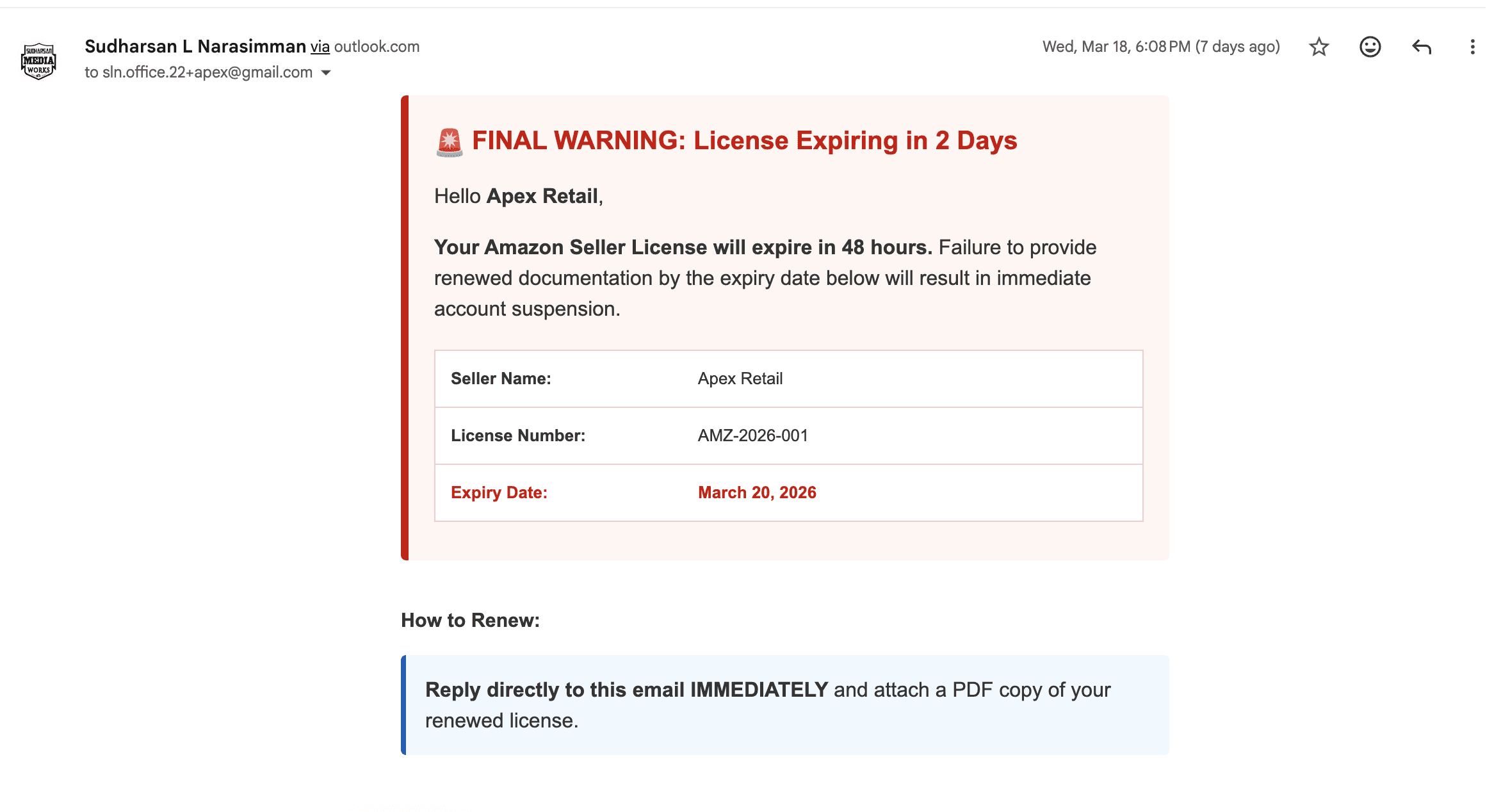
Screenshot of the inbox showing the HTML email and the 10, 7, and 2-day thread
HTML Email Structuring
Authored the warning emails using customized HTML to ensure the alerts looked like professional, highly readable business documents.
Dynamic Content Injection
Injected variables directly from the SharePoint loop (such as the specific Seller's Name and exact Expiration Date) into the HTML email body so every alert was highly personalized.
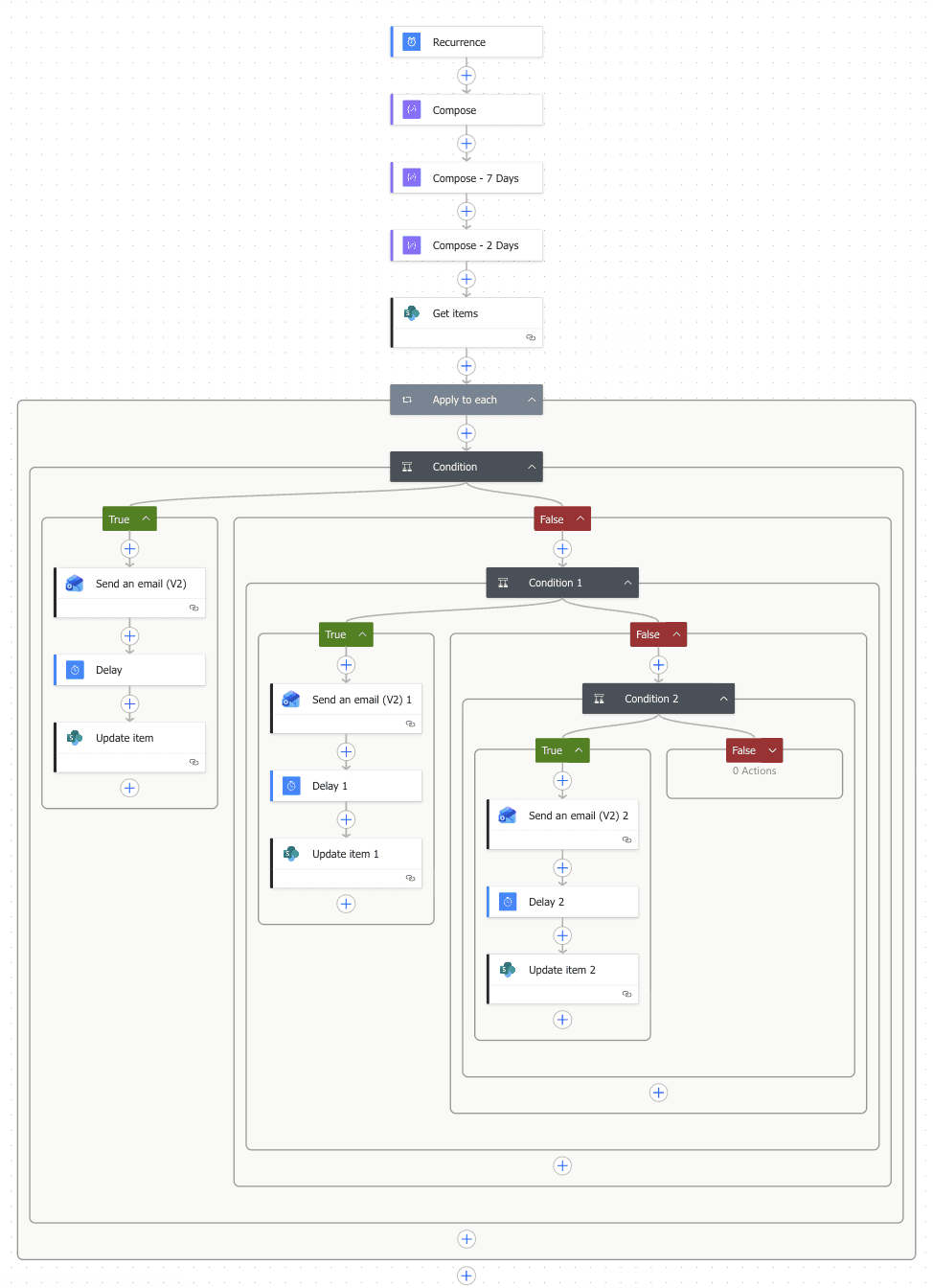
Screenshot of the Power Automate flow showing the Nested Conditions
The Final Experience: End-to-End Walkthrough
Before diving into the underlying code and system architecture, the video below demonstrates the final, fully integrated solution. This walkthrough showcases the seamless Single-Page Application (SPA) experience, highlighting the live-search functionality, the dynamic popup modal, and the intuitive, responsive layout that operators use daily to manage enterprise compliance without ever leaving the main dashboard.
Power Apps and Sharepoint Video Walkthrough


